How to Let AI Agents Create Accounts Without Letting Bots In
How to let AI agents create accounts without inviting abuse: gated free signups, signed agents, auth.md, OAuth client registration, and claim links.

If you want AI agents as customers, you have to let AI agents create accounts. Most products don’t. A coding agent asked to “set up a database and wire it into this app” opens the signup page, meets a CAPTCHA or an email code it can’t read, and either stops or hands the job back to its human. The tool it can actually set up gets the work. Opening the front door to everything doesn’t fix that. A gated free signup does: a verified agent gets a small, capped, sandboxed account right away, and a human claims it later.
The demand side is already here. When Databricks agreed to buy Neon in May 2025, it said the share of Neon databases created by AI agents had gone from 30% to over 80%. That is a database company whose signup and provisioning flow agents could get through. Products with human-only signups are invisible to that traffic.
This guide covers the pattern, the building blocks (signed agents, auth.md, OAuth dynamic client registration, claim links), and how Hi Violet tests that agents actually get through.
What is a gated free signup for agents?
A gated free signup lets an AI agent provision a scoped, rate-limited, sandboxed account with no human step. The account’s value is capped (quota, scope, lifetime) until a human claims it. Abuse is controlled by verifying the agent’s identity, not by puzzles. The agent gets to work now, and the human takes ownership later.
At a glance
- Most agent signups die at verification, not the form. CAPTCHAs, email codes, SMS checks, and card forms are built to stop software, and they do.
- Agent-side workarounds prove the wall is real. Vendors now sell agents their own inboxes and phone numbers just to get past email and SMS codes.
- The fix belongs on the product side. Accept a verifiable agent identity, issue a capped account, and hand the human a claim link.
- The parts are standard. Web Bot Auth signs agent requests,
auth.mdtells agents how to register, OAuth dynamic client registration removes manual client setup, and Netlify’s anonymous deploys show the claim-later pattern in production. - Test with agents, not a checklist. A signup that passes a readiness scan can still stop every agent before the first API call.
Why do AI agents fail at signup?
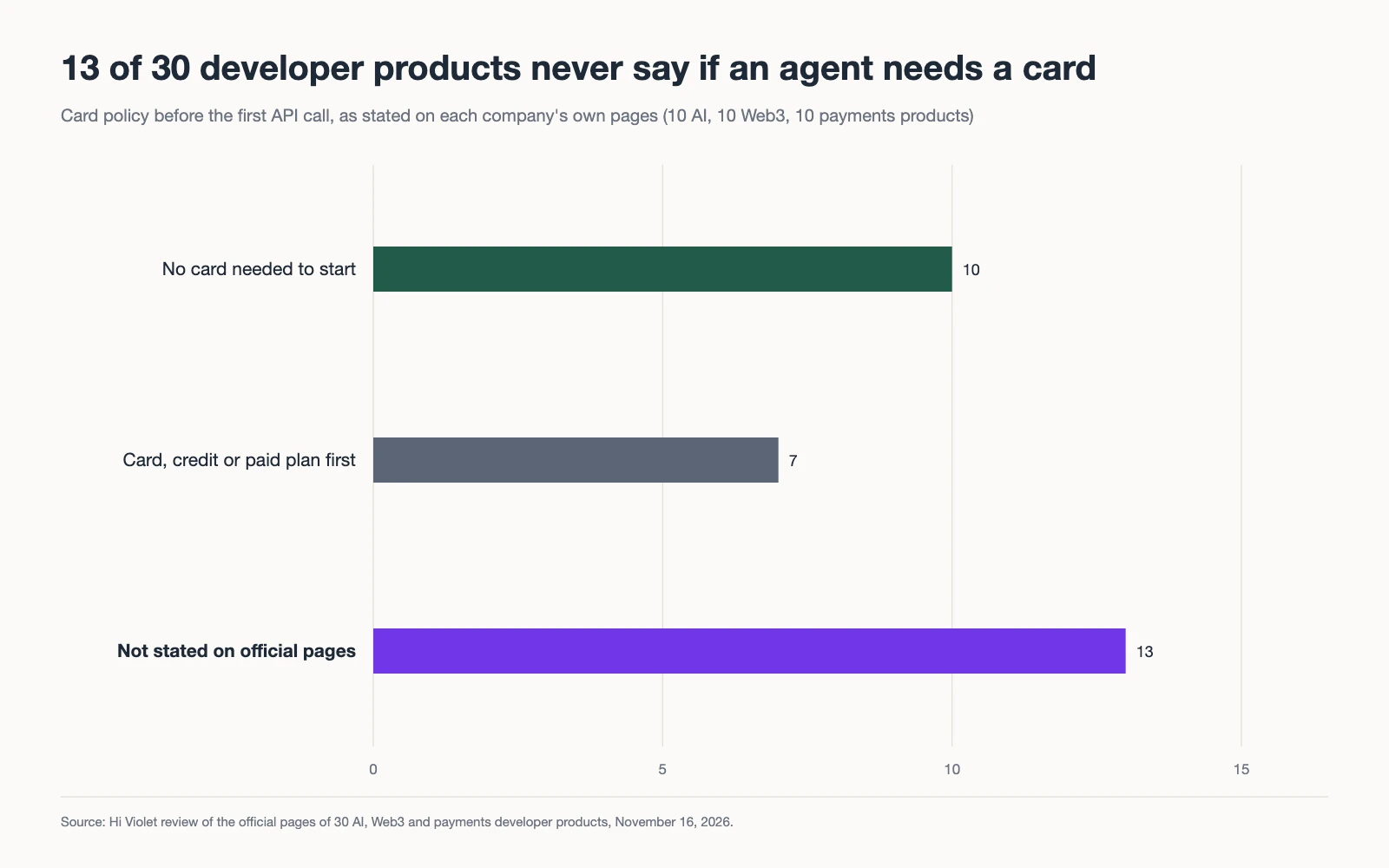
AI agents fail at signup because most signup flows are built to prove a human is present. CAPTCHAs, email codes, SMS codes, card forms, and OAuth consent screens each assume a person with an inbox, a phone, a wallet, and a mouse. An agent has none of those by default, so it stops at the first one. Our review of what 30 AI, Web3 and payments products ask before the first API call shows how common those walls are.
AgentMail, a company that sells email inboxes to agents, puts it bluntly: “Most agent signups die at the verification step, not the form, because the service sends a code somewhere the agent can’t read.” The same post says plainly that its product does not try to get around CAPTCHAs: “The test exists to stop software.”
Notte goes further and gives each agent a persona with its own mailbox, an SMS-capable phone number, and a credential vault, so agents can “create accounts, handle two-factor authentication, and interact with web platforms without manual intervention.” These tools work. They also show how much effort agents spend getting past walls the product could have opened for them on purpose, with terms the product sets.
Here is what that looks like when you run several agent types through one free-plan signup guarded by a CAPTCHA, an email code, and a card form:
Before: human-shaped gatesA free-plan signup guarded by CAPTCHA, email code, and a card form
- Cleared
- Asked
- Stopped
- Not reached
| Agent | 01Open signup | 02Pass the gate | 03Verify | 04Get an API key | 05Make a first call |
|---|---|---|---|---|---|
| Coding agent (CLI) | Cleared | Stopped | Not reached | Not reached | Not reached |
| Coding agent (IDE) | Cleared | Stopped | Not reached | Not reached | Not reached |
| Browser agent | Cleared | Cleared | Stopped | Not reached | Not reached |
| Chat assistant | Asked | Stopped | Not reached | Not reached | Not reached |
Figure 1. Four agent types attempt the same free-plan signup. Three stop at the gate itself. The browser agent passes the CAPTCHA but stops at email verification, so no run reaches an API key or a first call.
No run reaches the API. In your analytics, those four sessions look like bounces.
Why not just remove the gates?
Removing the gates trades one problem for a worse one. Free tiers attract fake accounts, scraped quotas, mining on free compute, and spam. Take the gates down with nothing in their place and you’ve built a free resource for anyone with a script.
The real job of a signup gate is to keep the value a stranger can extract below the cost of faking their way in. A CAPTCHA does that by making every signup cost a human minute. A gated free signup does it differently:
- Identity has a cost. A signed agent request, a registered operator, or an attested user is traceable and can be rate-limited or blocked as a unit.
- The account is small. Scope, quota, and lifetime are capped, so one fake identity gets very little.
- Ownership requires a human. The account only becomes a real free-plan seat when a person claims it, and claiming is where your normal checks (email, terms, later a card) still apply.
You keep the checks. You move them to the point where a human is present anyway.
How does a gated free signup work?
A gated free signup works in two phases. First, the agent proves who it is and gets a capped sandbox account with a scoped key and a claim URL. Then, once the agent has done useful work, it hands the claim URL to its human, who verifies an email, accepts terms, and takes ownership. Unclaimed accounts expire.
A gated free signup with a claim linkThe agent gets a capped account now; a human takes ownership later
Figure 2. The claim-link pattern. The agent requests an account with a signed request. The product checks identity and quota, issues a capped sandbox account with a claim URL, and the agent builds within the caps. The human claims the account later and the caps lift to the normal free plan.
Netlify shipped a version of this in March 2026. Its CLI added an --allow-anonymous flag that “lets you deploy without a Netlify account”. The deploy gets a live URL, and you can claim the project within an hour. Netlify’s changelog calls this “especially useful for AI agents that need to create temporary projects without requiring Netlify credentials upfront.” The cap here is time: one hour of existence unless a human steps in.
WorkOS wrote the pattern into a protocol. auth.md, published in May 2026, is a Markdown file at /auth.md that tells agents how to register. Its “User Claimed” flow has an anonymous-start variant: the agent gets a credential with limited permissions immediately, and the user later binds it to a real account with a six-digit code from your service. The agent can hit /agent-auth, /agent-auth/claim, and /agent-auth/claim/complete, and you choose whether it receives “short-lived access tokens or API keys.”
The caps are yours to set: one small database for 72 hours, 500 API calls, one project with watermarked exports. Pick caps that let an agent prove the product works on a real task, then stop.
Which gates should agents be able to pass?
Agents should be able to pass gates that check identity and accountability. They shouldn’t be expected to pass gates designed to detect software. In practice, that means swapping CAPTCHAs and SMS codes at the front door for signed agents and claim links, and moving email and card checks to the claim step, where a human is present.
The ratings below are Hi Violet’s, drawn from building and testing signup flows.
| Gate | Can an agent complete it? | Abuse resistance | Implementation cost | Where it belongs |
|---|---|---|---|---|
| CAPTCHA | No, by design | Medium; solver services exist | Low | Human form only |
| Email code (OTP) | Only with its own inbox | Low to medium; inboxes are cheap | Low | Claim step |
| Card on file | Rarely; most agents lack a card | High | Medium | Upgrade, not signup |
| Phone / SMS code | Only with a rented number | Medium | Medium; SMS costs money | Claim step, if at all |
| Signed agent (Web Bot Auth) | Yes, for agents that sign | High; identity is traceable | Medium | Agent front door |
| Claim link | Yes; the agent hands it off | High when paired with caps and expiry | Medium | Agent to human handoff |
Email codes look like a gate, but an agent with a cheap inbox passes them, so they mostly slow down agents that play fair.
How do you verify an agent without a CAPTCHA?
You verify an agent by checking a cryptographic identity instead of a human test. The agent signs its request or presents a token from a provider you trust, and you rate-limit and block by that identity. Four standards and products cover most of what you need: Web Bot Auth, auth.md, OAuth dynamic client registration, and agent-aware auth platforms.
Web Bot Auth and signed agents. Web Bot Auth uses HTTP message signatures so a bot or agent can prove who sent a request. In August 2025, Cloudflare opened a signed agents category for agents “generally directed by an end user instead of a single company,” and named ChatGPT agent, Block’s Goose, Browserbase, and Anchor Browser among the first. If you’re behind Cloudflare, you can treat a verified signed agent differently from an anonymous script: let it reach /signup/agent, and keep the CAPTCHA for everyone else.
auth.md’s Agent Verified flow. Besides the claim flow above, auth.md lets a trusted agent provider sign an assertion that “this agent is acting for this user,” which the agent posts to your /agent-auth endpoint. You get a real user identity without the user touching your signup form.
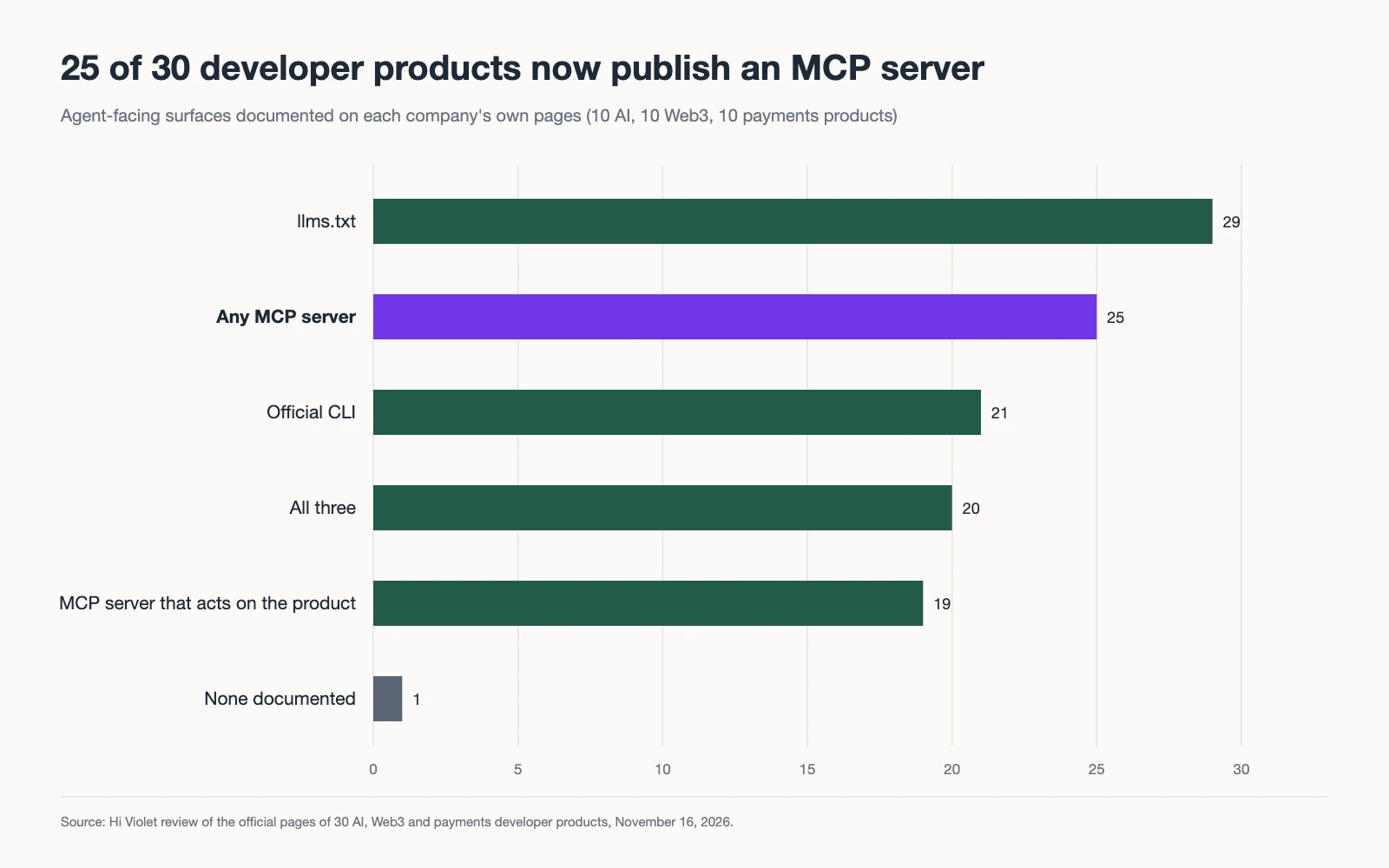
OAuth dynamic client registration. For products with an API or MCP server, the MCP authorization spec says clients and authorization servers SHOULD support OAuth 2.0 Dynamic Client Registration (RFC 7591), “to allow MCP clients to obtain OAuth client IDs without user interaction.” That removes the developer-portal step where someone creates an OAuth app by hand. It doesn’t create the user’s account, and a person still authorizes access, but it means an agent can connect to your API on first contact. Stytch’s Connected Apps, for example, implements RFC 7591 at POST /v1/oauth2/register as an opt-in feature.
Agent-aware auth platforms. Auth0 for AI Agents, generally available since November 19, 2025, adds Token Vault for agents calling third-party APIs on a user’s behalf and asynchronous authorization through CIBA. That covers the “agent asks, human approves on their phone” step that a claim link also needs. Clerk and WorkOS AuthKit sit in the same category.
These are building blocks. None of them decides which flows open to agents, how big the caps are, or whether a real agent finishes the path. That’s design and testing, and it’s the work Hi Violet does.
What should an agent see when it hits a wall?
When an agent hits a wall, it should get a machine-readable explanation and a next step, not a styled error page. Return the right status code, a short JSON body that says what’s required, and a link to where the agent can register properly, such as your auth.md. Agents act on instructions they can read. They guess at everything else.
Here is the response an unsigned agent request should get:
HTTP/1.1 403 Forbidden
Content-Type: application/json

{
  "error": "agent_signature_required",
  "message": "Agent signups must be signed. Unsigned requests use the human form, which includes a CAPTCHA.",
  "register": "https://example.com/auth.md",
  "human_signup": "https://example.com/signup"
}
Most agents get an HTML page with a red banner instead. Error copy is one of the cheapest fixes on any run board: one rewritten message can turn a Stopped run into a Cleared one.
How do you know the signup works for agents?
You know a signup works for agents when agents finish it, repeatedly, across agent types. A readiness scan can confirm that auth.md, an OAuth metadata document, or a signed-agent rule exists. It can’t tell you whether a coding agent gets from “set this up” to a working API call. Only a run can.
Static checks matter, and adoption of the newer standards is still thin. Cloudflare’s April 2026 scan of the top 200,000 domains found that MCP Server Cards and API Catalogs together appear on fewer than 15 sites, and markdown content negotiation passes on 3.9%. Being early is an advantage. But existence isn’t completion, which is the argument we make in agent readiness scores vs. task completion.
Hi Violet tests signups the same way every time. A fixed task (“create a free account and make a first successful call”), a fixed roster of agents (coding agents in a CLI and an IDE, browser agents, chat assistants), and several runs per agent in a sandboxed copy of the product. Each step gets a mark: Cleared, Asked (it got through only by asking a question the product never answers), or Stopped. We ship the fix, then re-run the identical task set.
After: gated free signup with a claim linkThe same task once signed agents can provision a capped account a human claims later
- Cleared
- Asked
- Stopped
- Not reached
| Agent | 01Open signup | 02Pass the gate | 03Verify | 04Get an API key | 05Make a first call |
|---|---|---|---|---|---|
| Coding agent (CLI) | Cleared | Cleared | Cleared | Cleared | Cleared |
| Coding agent (IDE) | Cleared | Cleared | Cleared | Cleared | Cleared |
| Browser agent | Cleared | Cleared | Cleared | Asked | Cleared |
| Chat assistant | Asked | Cleared | Cleared | Cleared | Cleared |
Figure 3. The same task after a gated free signup with a claim link. Every run reaches a first call. The browser agent asks how to find its key, a copy fix, and the chat assistant asks where the agent signup starts, a discovery fix.
The two remaining Asked marks are the next round of work. Re-running the same tasks shows whether a change helped and what the next-cheapest fix is. It’s the same discipline as measuring the decision rather than the data that happens to be available: for an agent, the decision is whether it can use your product.
How do you give an evaluating agent temporary access?
Give it one link to one resource that expires when the task does. Temporary access for AI agents fits a common case signup doesn’t: an agent evaluating your product for a buyer needs the private SDK docs, a demo sandbox or a data room for one task, and its principal doesn’t want an account yet.
The usual answers overshoot. An API key lasts until someone rotates it and works for whoever copies it. OWASP’s 2025 list of non-human identity risks names both problems: long-lived secrets (NHI7) and overprivileged identities (NHI5). Keys also leak: GitGuardian found 70% of secrets leaked in 2022 were still active in early 2025. A broad OAuth grant needs a registered client, an account and a consent screen, which is the friction a gated free signup exists to remove.
| Method | Lifetime | Revoke before expiry | Proves identity | Fit for a one-task agent |
|---|---|---|---|---|
| Scoped API key | Until rotated; often no expiry | Yes, if someone remembers | No, whoever holds it is in | Works, but outlives the task |
| OAuth grant | Short access token, longer refresh token | Yes, by revoking the grant | Yes, the consenting user | Poor: needs an account and a consent screen |
| Presigned S3 URL | Up to 7 days from the CLI or SDK | Only by revoking the signing credential | No, reusable bearer link | Good for one file, no app session |
| Magic link | Minutes to hours | Usually only by expiry | Proves mailbox control | Poor: the agent has to read an inbox |
| Capability link (for example qURL) | Owner-set deadline | Yes, per link or per session | Bearer link no; email invitation yes | Strong: one resource, one deadline |
A capability link is the narrowest grant: the link itself is the permission. LayerV’s qURL is one implementation. A connector next to the app reaches LayerV outbound, so no inbound port opens. The owner creates a link from the CLI, SDK, API or an MCP client with “a redemption deadline and supported use limits,” LayerV checks the grant on every redemption, and the app still decides what the session can do. The owner can “remove one person or end every open session, any time.” Without an account, LayerV allows “up to 3 active resources, with links that last up to 24 hours.” qURL for MCP also gives agents create_qurl and revoke_qurl_token, so a vendor’s support agent can issue and pull a link itself.
Temporary access with a qURLA private resource, one expiring link, no shared API key
Figure 4. One evaluation, one link. The resource stays private behind an outbound connector, the owner sets the deadline and use limit, and access ends on revocation. Behaviour as documented on LayerV’s qURL page, checked November 16, 2026.
Match the link to the resource. A one-time bearer link “opens once, for whoever holds it,” so it suits a docs bundle or a sandbox full of fake data. For a data room with pricing terms, use an email invitation, which requires the invitee to prove mailbox control and save a passkey, or keep your own app sign-in behind the link. Then run the evaluating agent through the task: a grant only proves the door opened, and the run shows whether the agent finished.
Where do payments and temporary access fit?
Signup is one of three ways to let an agent in. For metered resources, payment can replace the account. For private resources, a temporary link can replace both.
- Pay instead of sign up. With x402 payments, an agent pays per request over HTTP and never needs an account. The PIVX Agent Kit gives agents a private wallet on a separate rail. Products can support both for different or overlapping use cases, as covered in our comparison of agent payment protocols.
- Grant access instead of an account. When an agent is evaluating your product for a buyer and needs to see something private, a single-use, expiring link gives it temporary access without an API key.
A coding agent provisioning infrastructure needs an account. A research agent pulling one dataset needs a payment. An agent checking a private dashboard for a buyer needs a temporary look. As with the connected public surface we mapped for consumer-crypto products, each entry point should have one job and a clean handoff to the next.
How Hi Violet builds agent signups
Hi Violet’s agent experience work starts with runs, not opinions. We copy your signup, docs, and API into sandboxed environments, the same RL environments described on our method page, and send coding agents, browser agents, and assistants through the tasks your customers’ agents actually attempt. You get the board: where each agent cleared, asked, or stopped.
Then we fix what stopped them. That usually means a signed-agent front door, an auth.md file, a capped sandbox tier with claim links, agent-readable errors, and, where it fits, x402 or PIVX payments and qURL access. We build on whatever you already run (Stytch, WorkOS, Auth0, Clerk, or your own auth), re-run the same tasks, and show you the before and after.
Getting from a release to a customer now often runs through an agent, so the agent’s path to first value is part of your activation path. If you want to know whether agents can sign up for your product today, request access and we’ll scope a run against your real signup.
Frequently asked questions
Should you let AI agents create accounts?
Yes, through a gated path rather than an open door. Most signup flows stop agents with CAPTCHAs, email codes sent to inboxes the agent can’t read, SMS checks, or card forms. A gated free signup lets a verified agent provision a capped sandbox account immediately and hand a claim link to its human, who takes ownership later.
How do you let AI agents sign up without a CAPTCHA?
Replace the puzzle with identity. Accept signed agent requests through Web Bot Auth, publish an auth.md registration flow, or support OAuth dynamic client registration for API access. Then cap the account’s scope, quota, and lifetime until a human claims it, so faking an identity costs more than the account is worth.
What is auth.md?
auth.md is an open protocol WorkOS published in May 2026. A Markdown file at /auth.md on your domain tells agents how to register. It defines two flows: Agent Verified, where a trusted agent provider signs an assertion that the agent acts for a user, and User Claimed, where the user binds the agent’s credential with a six-digit code.
Does OAuth dynamic client registration let agents create accounts?
Not on its own. Dynamic client registration (RFC 7591) lets an agent’s client obtain an OAuth client ID without anyone creating an app by hand, and the MCP authorization spec says clients and servers SHOULD support it. A user still signs in and authorizes access. It removes developer-portal friction; it doesn’t replace the account.
What stops bots from abusing a free tier built for agents?
Identity, caps, and expiry. Require a verifiable agent signature or a registered operator, rate-limit per identity, run the account in a sandbox, cap its compute and data, and delete it unless a human claims it. The value one fake identity can extract stays below the cost of creating it.
What is Web Bot Auth?
Web Bot Auth lets bots and agents sign their HTTP requests with HTTP message signatures, so a site can verify who sent them. Cloudflare uses it for signed agents, a category it opened in August 2025 for agents directed by end users. ChatGPT agent, Goose, Browserbase, and Anchor Browser were among the first named.
What happens if no human claims the agent’s account?
It expires. The agent’s work lives in a sandbox for a window the product sets, such as the one hour Netlify gives anonymous deploys, and is then cleaned up. Unclaimed accounts never turn into permanent free-tier seats, which is what keeps the agent front door cheap to run.
How do you give temporary access for AI agents?
Issue one expiring link to one private resource instead of an API key or an OAuth grant. Set a deadline and a use limit, keep the ability to end the session early, and pair the link with an email invitation or your own app sign-in when you need to know who opened it. A capability link such as LayerV’s qURL does this without opening an inbound port.